
Changing the Logo: Logo Picker
There are two methods of changing the logo file itself: manual and via the logo picker.
The Logo Picker
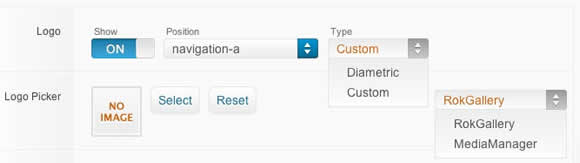
- Enable Logo and set to Custom at Admin → Extensions → Templates Manager → rt_diametric → Features.
- Set Logo Picker to either RokGallery or MediaManager, then Select and Save your logo file.
Manual Logo Change
You can still change the logo manually, versus the logo picker.
- Enable Logo and set Type to Diametric.
- Upload logo.png to the /templates/rt_diametric(_15)/images/logo/preset# directory
- Clear your browser cache and refresh.
If you cannot see your new logo, ensure you have uploaded it to the right directory and the directory permissions are writeable. Enquire with your hosting provider.
Download Sources HereContact Us:
Michigan Traveling Military Museum
P.O. Box 1341
Bay City, MI 48706

Sell Us Your Relics
The Michigan Traveling Military Museum is always interested in purchasing military memorabilia to add to our exhibits. If you have something to sell, please contact us.