
Creating your own Preset Style(s)
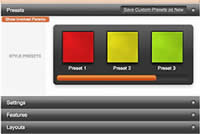
- Go to Extensions → Template Manager → (J1.5) rt_diametric_j15 → Settings; or (J2.5) rt_diametric → Show Presets
- Configure the Settings
- Click (J1.5) Save Custom Presets as New; (J2.5) Save Preset
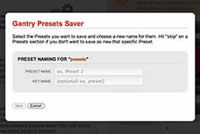
- Follow the Preset Saver procedure
You can edit the prebuilt presets in the gantry.config.php file, or use the User Interface method outlined above.
Contact Us:
Michigan Traveling Military Museum
P.O. Box 1341
Bay City, MI 48706

Sell Us Your Relics
The Michigan Traveling Military Museum is always interested in purchasing military memorabilia to add to our exhibits. If you have something to sell, please contact us.